

The saga so far: in May the decorators came home to Java - @Entity, @Repository, @Controller - and in June a real bean container arrived to honour them, with constructor injection and Spring-Boot muscle memory. Two posts about what you write and how it runs.
There was a quiet catch. You were writing all that beautiful, annotated, dependency-injected Java in an editor that, frankly, treated it like a .txt file with nice colours. No completion that knew your beans. No jump-to-definition. No red squiggle until the server told you. The runtime had grown up; the editor hadn't.
Now the editor has caught up - and then some. The Dirigible web IDE now speaks Java through Eclipse JDT Language Server (the same engine behind Java tooling in every serious editor), wired straight into Monaco in the browser. IntelliSense, refactoring, Call and Type Hierarchies, a live diagnostics panel, and an honest breakpoint debugger. No plugin to install, no SDK to download, no JAVA_HOME to argue with. Open a tab, write Java.

Here's what landed.
Autocomplete that's actually read your code
Press Ctrl+Space and you no longer get a dumb word list - you get JDT.LS completion that understands the whole classpath: the platform SDK, Spring, Hibernate, the JDK, and every other .java in your project. Pick a class and the import is added for you. Better still, Dirigible's own SDK annotations are ranked to the top, so typing @ surfaces @Controller, @Component, @Entity before anything from a transitive dependency you've never heard of.
The rest of the desktop-IDE comfort blanket is there too:
- Quick-fixes on the yellow lightbulb - create a missing field, add unimplemented methods, remove an unused variable.
- Generate constructors, getters/setters,
toString(),equals()/hashCode()- with a member picker so you choose exactly which fields. - Organize imports (
Shift+Alt+O) - remove unused, group, sort. - Postfix completion - type
order.varand let it writevar x = order;value.soutbecomesSystem.out.println(value). - Inlay hints - parameter names shown inline at call sites, inferred types on
var. - Semantic highlighting - classes, methods, fields and keywords each get their own colour, not one flat black wall of text.
- CodeLens - a quiet "N references" above each method; click to peek.
It feels like a desktop IDE because, under the hood, it's the same language server a desktop IDE would use.
Right-click → Java, and the boilerplate writes itself
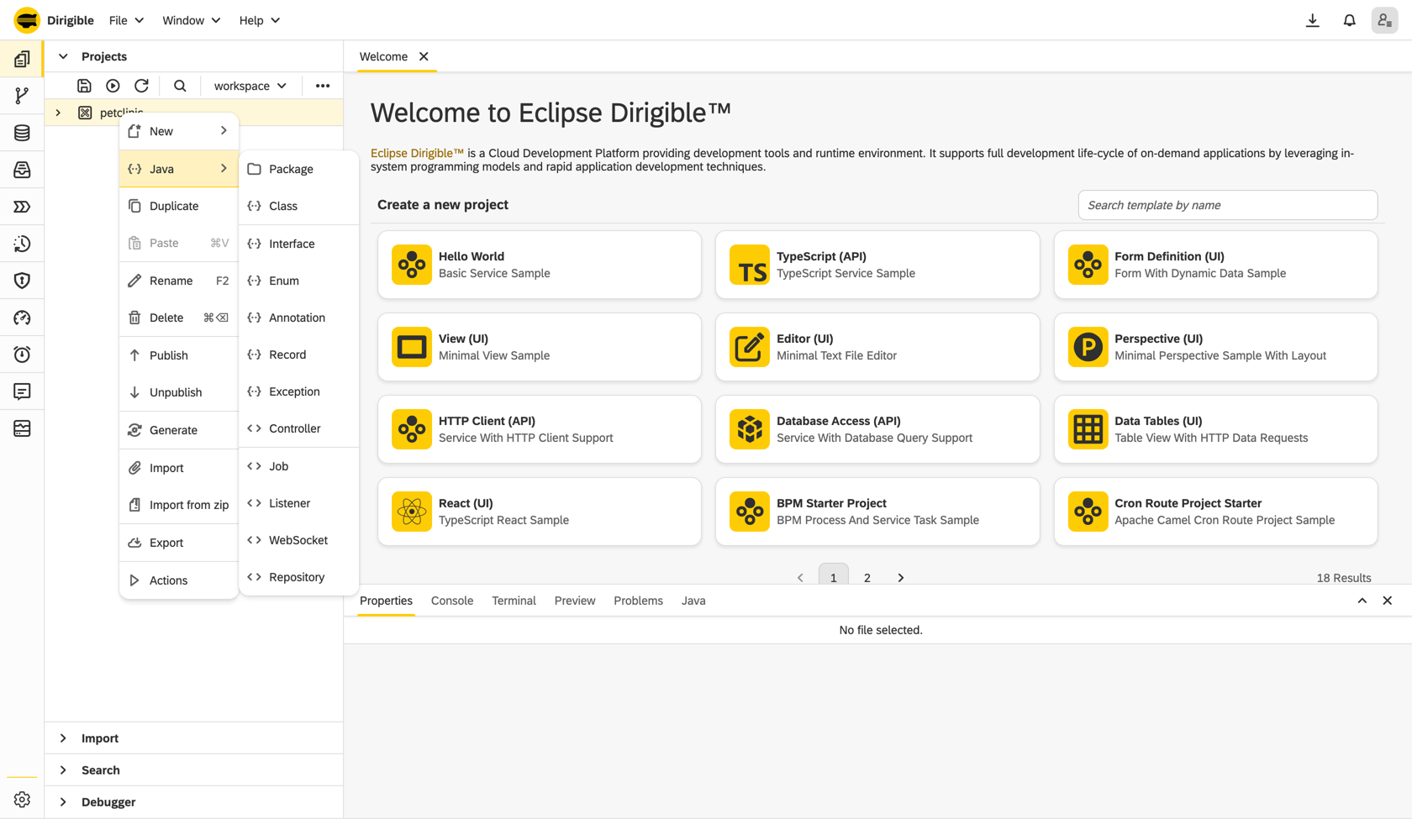
Right-click a project or folder and there's a dedicated Java menu. Not "new empty file" - real scaffolding:
- Package - type a dotted name and it creates the nested folders.
- Class, Interface, Enum, Annotation, Record, Exception - with the package declaration and type skeleton already filled in from the fully-qualified name you type.
- Ready-made
@Controller,@Repository,@Job,@Listener,@Websocketskeletons - the exact shapes from the programming model, generated correct on the first keystroke.
Give it com.acme.orders.OrderController and you get the folders, the package line, the annotation and the class body - then you start typing logic, not ceremony.
Navigate like the codebase is on your machine
Because it is, as far as the editor is concerned:
- Go to definition / implementation / type definition -
Ctrl+Clicka type and land on its declaration, across files. - Find references - every usage across the whole workspace, in a peek view with surrounding code; click to jump.
- Rename symbol (
F2) - rename a method or class and every reference across every file updates - and if it's a public type, the file is renamed with it. Open editors reload to match. - Outline, breadcrumbs, sticky scroll, code folding, occurrence highlighting - the structural niceties you stop noticing only because they're always right.
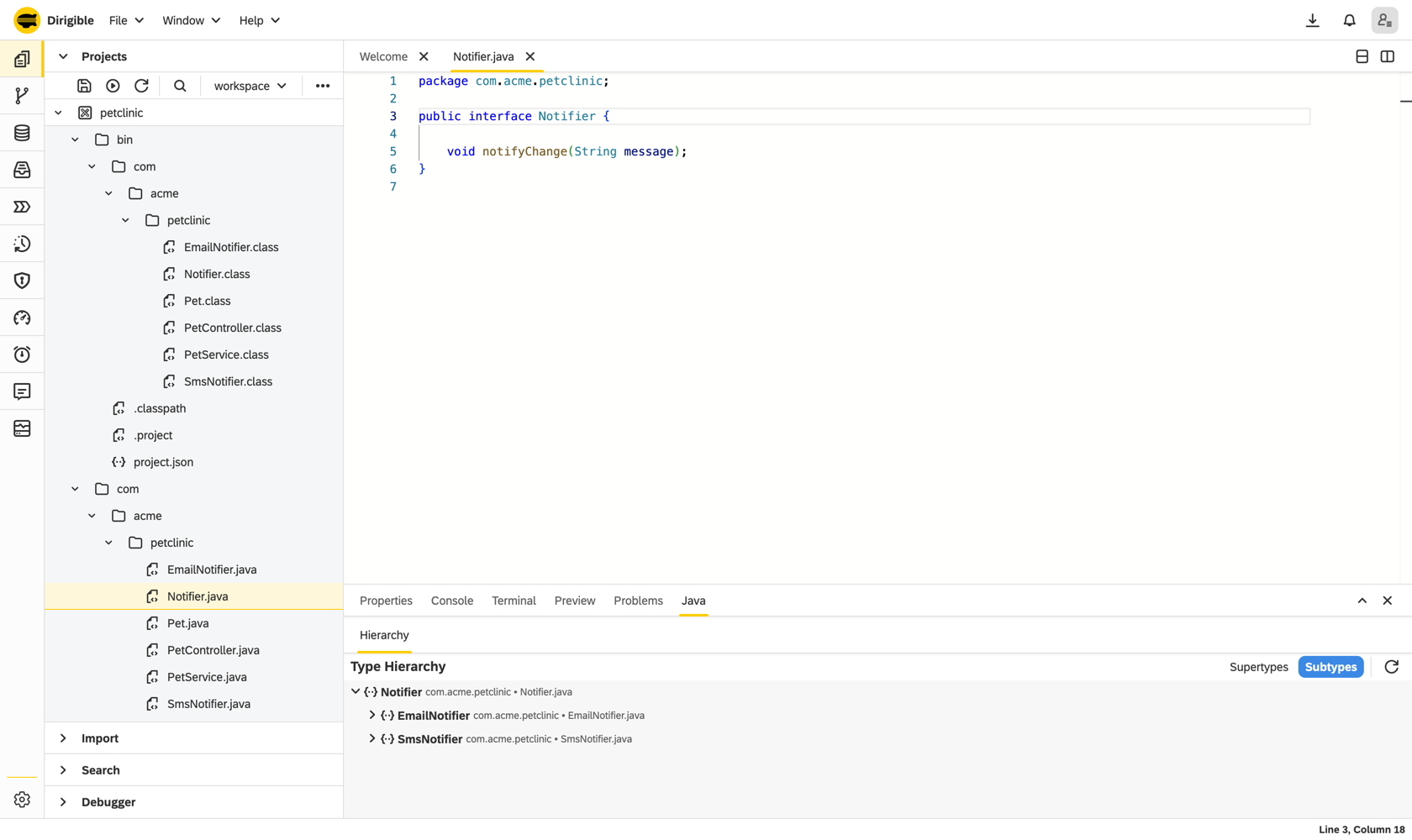
And the two headliners, in their own Java panel at the bottom:
- Call Hierarchy (
Ctrl+Alt+H) - who calls this method, and who calls them, expanded lazily down the tree. Navigate straight to any caller. - Type Hierarchy (
Ctrl+H) - the full supertype/subtype tree for any type.
Tracing "what actually triggers this" used to mean a full-text search and a lot of faith. Now it's a tree you can walk.
See every red squiggle before you hit run
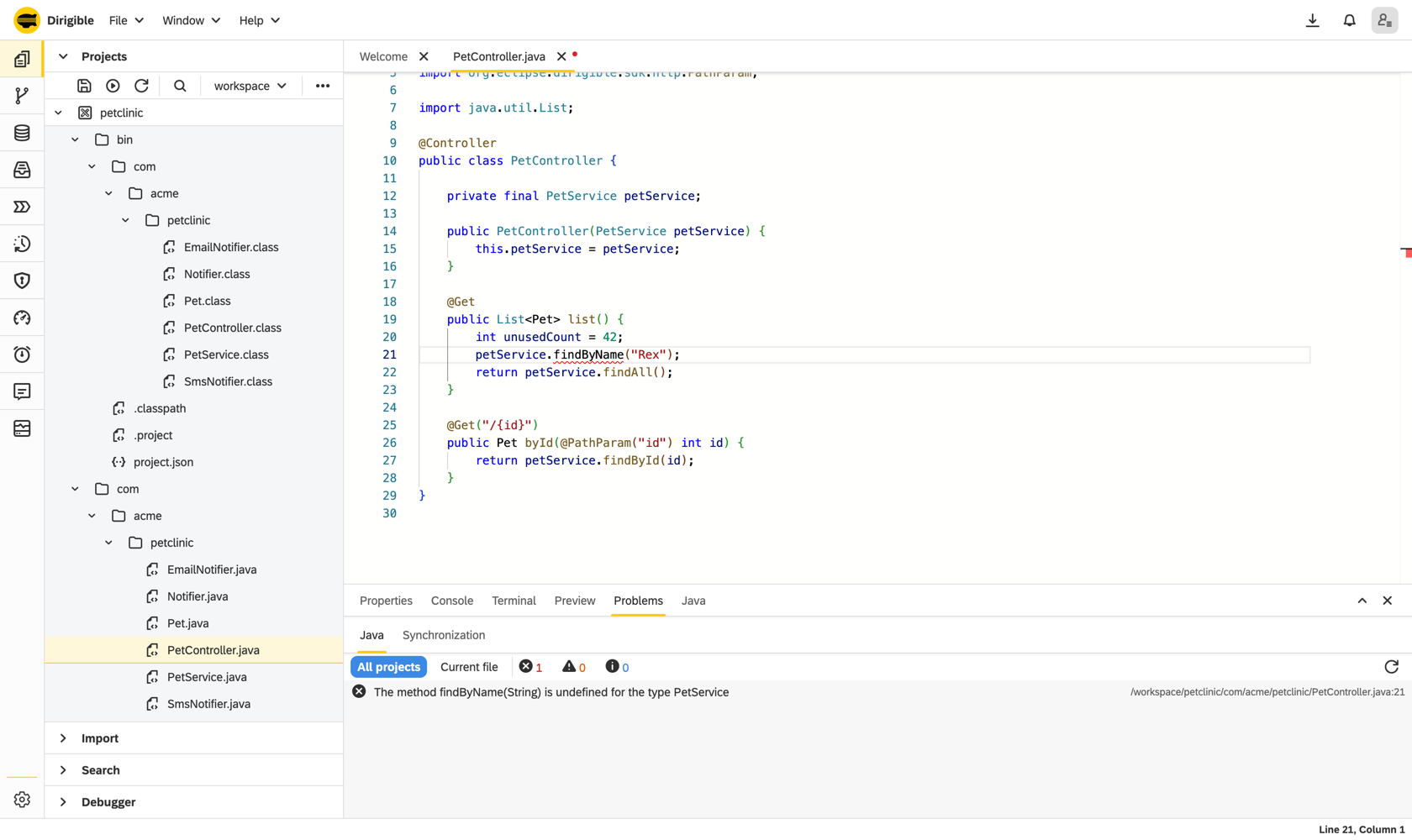
The Problems panel grew a dedicated Java tab fed by live, workspace-wide compile diagnostics straight from JDT.LS - errors, warnings, info, hints. It's push-based, not polling: the moment the language server re-analyses, the list updates (debounced so it doesn't flicker). Toggle the scope between the current file and all projects, filter by severity, click a row to land on the exact line.
Then the part that's pure Dirigible. When you save, the container rebuilds your beans - and if it can't, those bean-wiring errors land in the same Problems panel: an unsatisfied dependency, an ambiguous type, a construction cycle, a class that illegally mixed two handler styles. The thing that would be a stack trace buried in a server log on a traditional stack is, here, a clickable problem marker in your browser pointing at the offending file. Compile-time and wiring-time mistakes, surfaced the same way, before a single request hits your code.
Set a breakpoint. In a browser.
Yes, really. Click the glyph margin to drop a breakpoint, and the IDE attaches to the running JVM (over JDWP, bridged through the Debug Adapter Protocol). When execution pauses you get the full kit: step in / over / out, an inspectable variables view, and the live call stack - and clicking a stack frame opens the right source at the right line. That last bit sounds trivial; it wasn't. Source-path mapping was fixed so that stepping into a file in a git-backed workspace project opens your file instead of failing and closing the tab.
Debugging server-side Java, from a browser, against the very instance you're building in. No remote-debug launch config to hand-assemble.
Save. That's the whole loop.
No mvn package. No build. No redeploy. No restart.
You hit Ctrl/Cmd+S - and that now reliably saves, every time, even while the language server is still warming up (organize-imports was pulled out of the save path so a busy LSP can never block it). The synchronizer recompiles every client source in one pass, swaps in a fresh classloader, rebuilds the bean container, and your next request hits the new wiring. The old generation becomes unreachable and the JVM reclaims its memory. The edit-to-running gap is the time it takes to press one key.
That loop is the whole reason Dirigible exists - in-system programming, where you build the running system from inside itself. The IDE work here is what finally makes doing it in Java feel as good as it should.
What you're actually writing
If you haven't seen the model, it reads like Spring Boot on purpose:
@Controller
public class GreetingController {

    private final GreetingService greetings;   // constructor-injected by type

    public GreetingController(GreetingService greetings) {
        this.greetings = greetings;
    }

    @Get("/greet/{name}")
    public String greet(@PathParam("name") String name) {
        return greetings.greet(name);
    }
}@Component, constructor injection, List<T> collection injection, @Repository extends JavaRepository<T>, self-describing JobHandler / MessageHandler / WebsocketHandler or method-level @Scheduled / @Listener / @Websocket - the full tour is in Muscle Memory: Spring-Style Beans and Injection and the Coming from Spring Boot guide. Now you get to write all of it with completion, refactoring and a debugger behind you.
Try it
- Start Dirigible, open the IDE, and create or open a project.
- Right-click → Java →
Controller. Start typing - watch the completion, the auto-imports, the squiggles. - Save. Hit your endpoint. Set a breakpoint and step through it.
Prefer to start from working code? Clone any of the samples and publish:
dirigiblelabs/sample-java-entity-decorators- the kitchen sink:@Entity/@Repository/@Controllerplus an injected service.sample-java-job-decorator,-listener-decorator,-websocket-decorator,-extension-decorator.
The developer docs live at /help/develop and the full SDK reference at /sdk/.
Missing something? Tell us.
We built this to feel like the Java IDE you already know - and we know you'll find the thing it doesn't do yet. Maybe it's an extract-interface refactor, a watch expression in the debugger, a formatter option, an inspection you rely on. That's exactly what we want to hear.
Open an issue at github.com/eclipse-dirigible/dirigible/issues and tell us what your desktop IDE does that ours doesn't yet. The fastest way onto the roadmap is a concrete "here's the workflow I miss."
The runtime grew up first. Now the editor has too. Open a tab - your Java has never had it this good in a browser.