

Every endpoint you protect in Eclipse Dirigible is protected the same way: a role. You assign roles to users, you guard paths with roles in your *.access constraints, and the platform checks the authenticated principal's authorities on every request. It's a clean, uniform model - as long as there is an authenticated principal.
But some callers aren't people.
A scheduled job in another system, a CI pipeline, a partner backend, a service mesh sidecar - these authenticate as machines, using the OAuth2 Client Credentials grant. The token they get back is deliberately bare: no user, no groups, no id token. There's nobody to look up, no group membership to expand. The only thing the token tells you about what the caller is allowed to do is its scope claim.
Until now, Dirigible had no way to turn that scope into the roles its endpoints actually check. So machine-to-machine (M2M) traffic didn't fit the model.
That gap just closed.
Dirigible now maps the
scopeclaim of a validated resource-server token to Dirigible roles. The same role-protected endpoints that authorize your interactive users authorize your machines - no parallel authorization path, no special-casing in your services.
The shape of the problem
A Client Credentials token looks nothing like a user's session token. Here's the relevant part of a typical one:
{
  "sub": "5gm8...the-client-id",
  "token_use": "access",
  "scope": "my-resource-server-a1b2c3/orders-manage athena-admin",
  "exp": 1780000000
}
There's no email, no cognito:groups, no name. If your endpoints authorize on roles - and in Dirigible they do - this token is unusable on its own. The scope claim is the whole signal.
The job of the new feature is to answer one question: given these scopes, which Dirigible roles does this caller have?
1:1 by default - zero configuration
The common case needs no setup at all.
When a scope's name matches a role name, Dirigible maps it directly. A token carrying the scope athena-admin grants the athena-admin role. Protect an endpoint with that role and the machine gets in - nothing to declare, nothing to publish.
A couple of details the resolver handles for you:
- Qualified scopes. Some authorization servers prefix custom scopes with a resource-server identifier - AWS Cognito issues them as
<resource-server-identifier>/<scope-name>, where the identifier carries a generated random suffix you shouldn't hard-code against. Dirigible takes the bare scope name - the part after the last/- somy-resource-server-a1b2c3/orders-manageresolves toorders-manage. - Standard OIDC scopes are ignored. Scopes with no
/likeopenid,email,profile, oraws.cognito.signin.user.adminaren't roles and are skipped - they never accidentally grant access.
For a lot of setups, that's the end of the story. Name your scopes after your roles and you're done.
When one scope should grant several roles - the *.scopes artefact
Sometimes a single scope needs to map to more than one role. A manager scope might need both CountryFullAccess and CityFullAccess; an operations scope might grant ADMINISTRATOR and OPERATOR. A scope name can't be two roles at once, so for that case Dirigible adds a new artefact type: *.scopes.
It's a single JSON file - a list of scope-to-roles mappings:
[
   {
      "scope": "orders-manage",
      "roles": [
         "sample-app.Orders.OrderFullAccess",
         "sample-app.Orders.OrderReadOnly"
      ],
      "description": "Manage orders"
   },
   {
      "scope": "athena-admin",
      "roles": [
         "ADMINISTRATOR"
      ]
   }
]
Publish it like any other artefact and the mappings are registered with the security engine. From then on, a token carrying orders-manage grants both of the declared roles.
The two strategies compose cleanly. For each scope on a token:
- If it has an entry in a
*.scopesartefact → it expands to all the roles declared there. - If it doesn't → it falls back to the 1:1 mapping (scope name is role name).
So you only ever write a *.scopes mapping for the scopes that genuinely need more than one role. Everything else just works.
Authoring it in the IDE
You don't have to hand-write the JSON. This release ships a Scopes form editor, alongside the existing Roles and Access surfaces in the Security perspective.
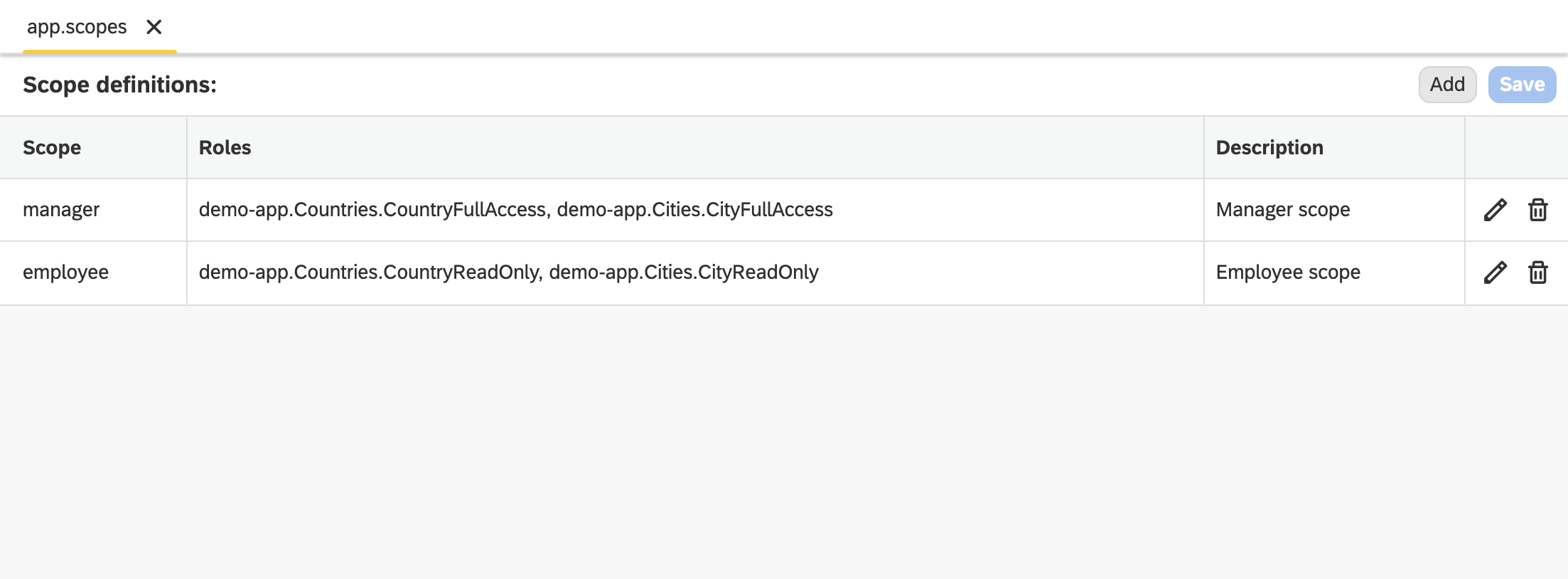
Create one from New → Scopes Definitions in the Projects view. You get a starter file with a couple of example mappings, and a table editor with Scope, Roles, and Description columns - Add a row, edit or delete inline, Save.
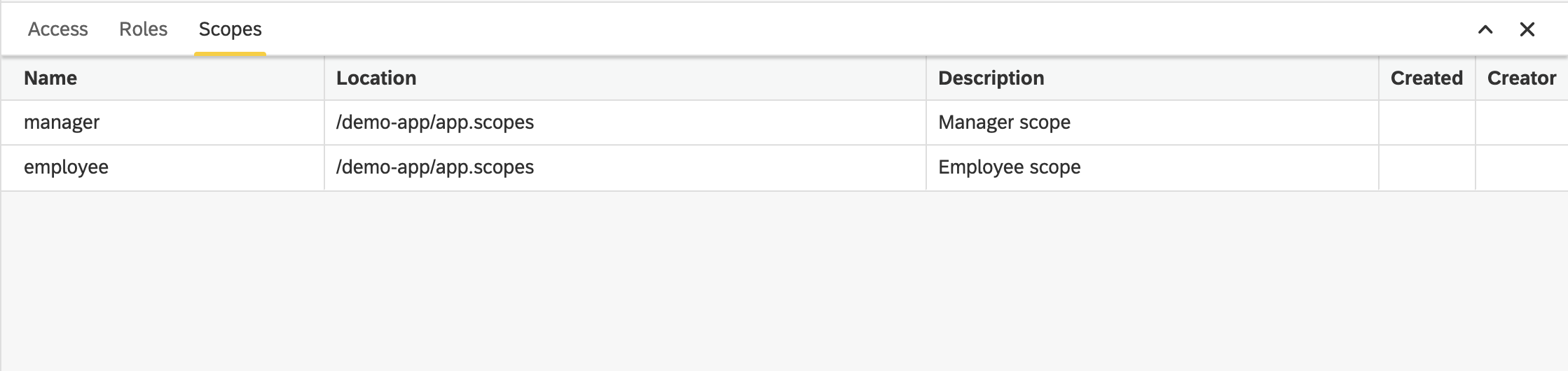
There's also a Scopes view that lists every scope-to-role mapping currently defined across your *.scopes artefacts, so you can see the whole picture at a glance.
How it fits the request flow
It's worth being precise about what this feature does and - just as importantly - what it doesn't.
When a request arrives with an OAuth2 Bearer (resource-server) token, the token is validated exactly as before: signature, issuer, and JWK set are all checked by the resource-server configuration. Scope mapping does not touch validation. It runs after, on the already-validated claims, and does one thing: derive role authorities.
The resolver reads the scope claim (falling back to scp, which some authorization servers use), accepts it as either a space-delimited string or a list, resolves each scope to role names through the two-step strategy above, and turns the result into the same ROLE_ authorities that an interactive session produces.
That last point is the whole design goal:
A role-protected endpoint can't tell whether the
ROLE_authority in front of it came from a logged-in user's group membership or from a machine's mapped scope. It authorizes both the same way.
No new annotations on your services. No M2M-specific branch in your access constraints. The roles you already use are the roles M2M tokens are granted.
It's shared by every resource-server provider - AWS Cognito and Keycloak today - so the behaviour is identical wherever your tokens come from.
A quick end-to-end
Say you want a partner backend to manage orders.
- Protect the endpoint with a role -
sample-app.Orders.OrderFullAccess- the way you already do. - Decide the mapping. If the partner's token will carry exactly that scope name, you're done - 1:1 handles it. If their token carries a single
orders-managescope that should grant both full-access and read-only roles, drop a*.scopesfile (like the one above) and publish it. - Configure the client in your authorization server (Cognito / Keycloak) to issue the
orders-managescope for the Client Credentials grant. - The partner requests a token and calls your endpoint with
Authorization: Bearer <token>. Dirigible validates it, mapsorders-manageto the roles, and authorizes the call - through the exact same role check that guards your human users.
No glue code. No second authorization model.
Why it matters
- One authorization model for people and machines. Roles were already the lingua franca of Dirigible authorization. Now M2M tokens speak it too, instead of forcing a parallel path.
- Zero-config for the common case. Name scopes after roles and the 1:1 fallback does the work - no artefact required.
- Explicit when you need it. The
*.scopesartefact is there for the one-scope-many-roles case, fully versioned and reviewable alongside the rest of your project. - Provider-agnostic. Cognito and Keycloak resource servers share the exact same resolution, so your design doesn't depend on the issuer.
- Validation untouched. Signature, issuer, and JWK-set checks are exactly as they were. This only derives authorities from claims that already passed.
Try it
- Protect an endpoint with a role in your project's
*.accessconstraints. - Create a Scopes Definitions file from the IDE (New → Scopes Definitions) if you need a scope to grant more than one role - otherwise rely on the 1:1 fallback.
- Configure a Client Credentials client in Cognito or Keycloak that issues the matching scope.
- Request a token and call your protected endpoint with it.
Full documentation: the Scopes Editor page walks through the artefact, the editor, and the resolution rules; the Scopes view and Artifacts Overview cover the rest.
Machines have always been first-class callers of your Dirigible services. Now they're first-class citizens of your authorization model too.