
Scopes Editor
The Scopes editor lets you map OAuth2 scopes to one or more Dirigible roles through scope definition files (*.scopes). A single *.scopes file can hold multiple scope-to-role mappings.
Scope mapping enables OAuth2 Client Credentials (machine-to-machine, M2M) authorization. M2M tokens carry no user, no groups and no id token — the only access signal they provide is the scope claim. The Scopes editor is where you declare how those scopes translate into the roles that protect your endpoints.
TIP
Scopes are only needed when a single scope must grant several roles, or when you want an explicit, named mapping. When a scope maps one-to-one to a role of the same name, no *.scopes file is required — see How scope mapping works below.
Create a Scopes Definitions File
Right-click on your project in the Projects view and choose New → Scopes Definitions.
Enter a name for the scopes file (the
.scopesextension is added automatically).
A new file is created, pre-populated with a couple of example mappings:
[
    {
        "scope": "administration",
        "roles": [
            "ADMINISTRATOR"
        ],
        "description": "Administration scope"
    },
    {
        "scope": "operations",
        "roles": [
            "ADMINISTRATOR",
            "OPERATOR"
        ],
        "description": "Operations scope"
    }
]
Create a Scope Mapping
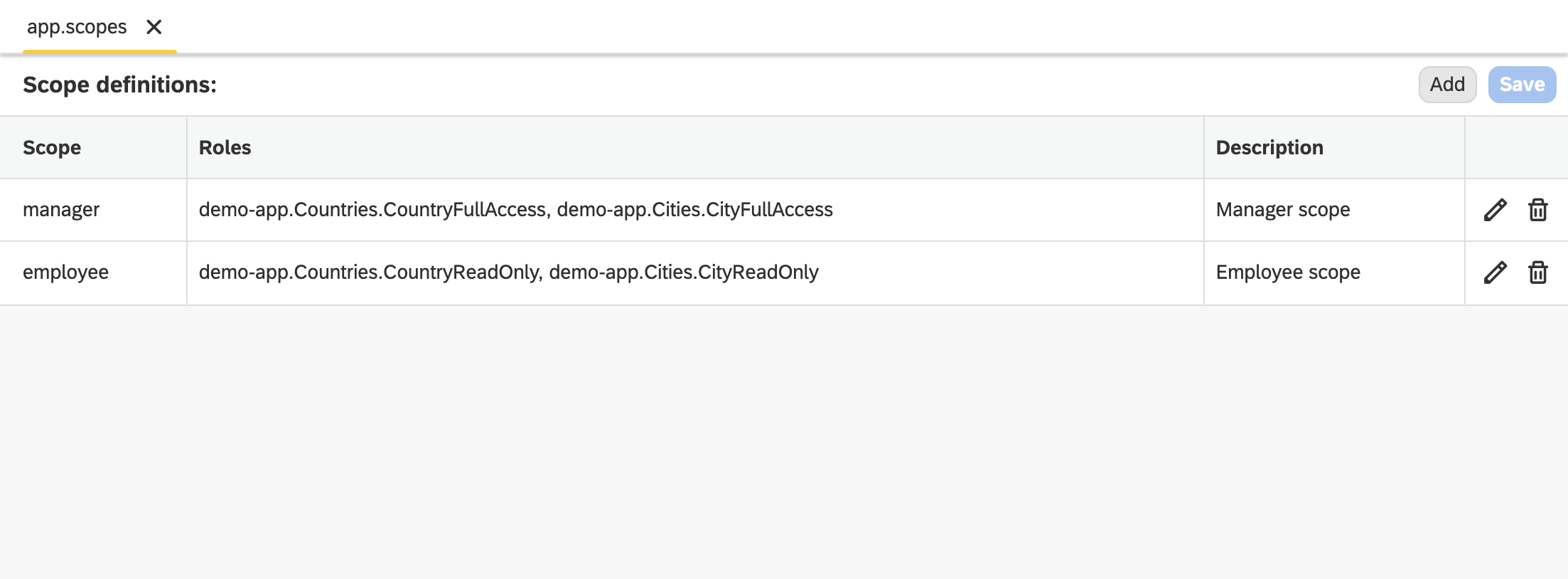
Double-click on your scopes file to open it in the Scopes editor. The editor shows a table of the defined mappings with Scope, Roles and Description columns.
Click on the Add button.
In the dialog, fill in:
- Scope — the bare scope name (see Scope name resolution).
- Roles — one or more Dirigible role names that the scope grants.
- Description — an optional, human-readable description of the scope.
Confirm to add the mapping to the table.
Use the edit and delete actions on each row to maintain existing mappings.
Click Save.
When the file is saved and synchronized, the scope mappings are registered with the security engine and become available to the resource-server providers.
The *.scopes artifact
A *.scopes file is a JSON array of scope mapping objects:
| Field | Required | Description |
|---|---|---|
scope | yes | The bare scope name to map. |
roles | yes | An array of one or more Dirigible role names the scope grants. |
description | no | A human-readable description of the scope. |
Example:
[
    {
        "scope": "orders-manage",
        "roles": [
            "sample-app.Orders.OrderFullAccess",
            "sample-app.Orders.OrderReadOnly"
        ],
        "description": "Manage orders"
    },
    {
        "scope": "athena-admin",
        "roles": [
            "ADMINISTRATOR"
        ]
    }
]
How scope mapping works
When a request arrives with an OAuth2 Bearer (resource-server) token, the token is first validated as usual (signature, issuer, JWK set). Scope mapping does not affect validation — it only derives authorities from the already-validated claims.
The scope claim (or the alternative scp claim) is read. It may be either a space-delimited string or a list of values. Each raw scope value is then resolved to Dirigible role names:
- Scope name resolution — the bare scope name is extracted (see below).
- Mapping lookup — if the bare scope name has an entry in a
*.scopesartifact, it expands to all the role names declared there. - 1:1 fallback — if the scope name has no mapping, it falls back to a one-to-one mapping where the scope name is the role name.
The resulting role names are turned into the same ROLE_ authorities used for interactive (user) sessions, so role-protected endpoints authorize M2M requests exactly as they do user requests.
Scope name resolution
Some authorization servers qualify custom scopes with a resource-server prefix. For example, AWS Cognito issues scopes as <resource-server-identifier>/<scope-name>, where the resource-server identifier carries a generated random suffix.
- The bare scope name is the substring after the last
/in the raw scope value. - Standard OIDC scopes that contain no
/(such asopenid,email,profile,aws.cognito.signin.user.admin) are not treated as roles and are ignored.
So a raw scope of my-resource-server-a1b2c3/orders-manage resolves to the bare name orders-manage, which is then looked up in your *.scopes mappings (or falls back to the orders-manage role).
Supported providers
Scope-to-role mapping is applied by the OAuth2 resource-server security configurations and is shared by every provider, including:
- AWS Cognito
- Keycloak
Related content