


This is your last chance. After this, there is no going back.
Take the blue airship - MDA, Model-Driven Architecture - and the story ends the way it always has. You draw the models by hand, wire the layers, write the glue, and ship the same three-tier application you have shipped a hundred times. It is a known, comfortable world.
Take the red airship - IDD, Intent-Driven Development - and you stay in Wonderland, and Eclipse Dirigible shows you how deep the rabbit hole goes. You describe the application you want in a single intent file, and the platform generates the data model, the persistence, the REST APIs, the UI and the workflow for you. Both are airships; only one lets you fly without building the engine first.
This article takes the red one. We build a real Library management application end to end - from an empty project to a running app with an approval workflow - without hand-writing CRUD, REST or UI code. The finished sample lives at sample-intent-model.
The three altitudes
The idea you need to grok first: there are three levels, and you author only the top one.
| Altitude | Artefact | Authored by |
|---|---|---|
| 1 - Intent | one *.intent file | you (and the AI assistant) |
| 2 - Models | .edm / .bpmn / .form / .report / .roles / .csvim | generated from the intent |
| 3 - Application | schema, persistence, REST, UI, jobs, processes | generated from the models |
You edit the intent; the platform deterministically produces everything below it. Change a line, regenerate, and the whole stack follows.
The scenario
A classic operational domain: a Library with books, genres and members, where a member borrows a book as a Loan. Loans and new member registrations both go through review - a librarian approves, a rare book gets a second look from a curator, and the member is notified. That is exactly the kind of auditable, multi-step process Eclipse Dirigible is built for.
Step 1 - Create the project and the intent
In the Dirigible web IDE, create a project and add a file library.intent at its root. You can type the YAML by hand, but the faster path is to prompt the AI assistant built into the Intent Editor. Open the assistant pane and describe what you want:
"A library with Genre reference data, Books (title, summary, price, availability), and Members. A member has Loans - each loan links a member to a book with a loan date and a due date. Add a loan approval process: a librarian reviews, expensive rare books get a curator review, then notify the member. Also approve new member registrations."
The assistant proposes a complete app.intent as a diff against your buffer. You review it, click Accept, and the editor's live diagram updates instantly.
Step 2 - The intent, in plain YAML
What the assistant produces (and what you can refine by hand) is readable and compact. The core entities - genre reference data, the book, and the member with its loans:
name: library
description: Library management with a loan approval workflow

entities:
  - name: Genre
    kind: setting
    description: Reference data for book genres
    fields:
      - { name: id,   type: integer, primaryKey: true, generated: true }
      - { name: name, type: string,  required: true, length: 100 }

  - name: Book
    fields:
      - { name: id,          type: integer, primaryKey: true, generated: true }
      - { name: title,       type: string,  required: true, length: 200 }
      - { name: summary,     type: text }
      - { name: price,       type: decimal }
      - { name: available,   type: boolean, defaultValue: "true" }
      - { name: publishedOn, type: date }
      - { name: loanCount,   type: integer }                              # maintained by the bookLoanCount roll-up
    relations:
      - { name: genre, kind: manyToOne, to: Genre }                       # optional association
Two things worth noticing:
kind: settingonGenremarks it as reference data (a nomenclature the platform seeds and surfaces as a settings screen), not a transactional entity.defaultValue: "true"onBook.availableand theloanCountcomment hint at the declarative glue further down:loanCountis not something you maintain by hand, a roll-up keeps it in sync.
Step 3 - Members, loans and the master-detail record
A Member owns a collection of Loan records, and each Loan is a detail of its member. Two small flags make that relationship real:
  - name: Member
    fields:
      - { name: id,       type: integer,   primaryKey: true, generated: true }
      - { name: name,     type: string,    required: true, length: 200 }
      - { name: email,    type: string,    length: 200 }
      - { name: joinedAt, type: timestamp }
      - { name: status,   type: string,    length: 20, defaultValue: "PENDING" }  # PENDING -> ACTIVE/REJECTED via MemberApproval
    relations:
      - { name: loans, kind: oneToMany, to: Loan }                        # master's detail collection

  - name: Loan
    fields:
      - { name: id,       type: integer, primaryKey: true, generated: true }
      - { name: number,   type: string }                                    # human-friendly loan number; the process business key
      - { name: loanedOn, type: date,    required: true }
      - { name: dueOn,    type: date }
    relations:
      - { name: member, kind: manyToOne, to: Member, composition: true }  # master-detail: Loan is a detail of Member
      - { name: book,   kind: manyToOne, to: Book,   required: true }     # NOT NULL association
composition: trueon thememberrelation makesLoana detail ofMember- the platform generates a master-detail screen where a member's loans are managed inside the member record. TheoneToManyloansrelation onMemberis the collection side of the same link.statusstarts atdefaultValue: "PENDING"at the database level - a new member is PENDING the instant it is inserted, without any code or a workflow step. TheMemberApprovalprocess later flips it toACTIVEorREJECTED. Setting the initial status from a process step would race the trigger that starts the process; the column default is race-free.required: trueon thebookrelation makes it a NOT NULL association - a loan without a book is not a loan.
Step 4 - The workflow, declared in the same file
Creating a Loan starts the LoanApproval process. A librarian reviews, a rare book (over 500) gets a curator review, and an approved loan notifies the member:
processes:
  - name: LoanApproval
    # Creating a Loan starts this process. Its BPM business key is the Loan.number field; the
    # `timestamp` strategy mints a yyyyMMddHHmmss value into number when it is blank, so the process
    # is correlatable by a human-friendly loan number rather than the surrogate id.
    trigger: { onCreate: Loan, businessKey: number, businessKeyStrategy: timestamp }
    steps:
      - name: librarianReview
        kind: userTask
        args: { assignee: librarian, form: ApproveLoan }
      - name: rareBook
        kind: decision
        # book.price is a relation.field path: the generated resolver loads the Loan's Book and
        # exposes its price as a process variable just before this decision.
        args: { if: "book.price > 500", then: curatorReview, else: notifyMember }
      - name: curatorReview
        kind: userTask
        args: { assignee: curator, form: ApproveLoan }
      - name: curatorDecision
        kind: decision
        args: { if: "action == 'approve'", then: notifyMember, else: done }
      - name: notifyMember
        kind: serviceTask   # no `call` -> a Java handler stub is scaffolded once at custom/NotifyMember.java
      - name: done
        kind: end
A few things earn their keep here:
businessKey: number, businessKeyStrategy: timestampcorrelates the process by a human-friendly loan number. Whennumberis blank thetimestampstrategy mints ayyyyMMddHHmmssvalue into it, so you track the process by a readable loan number rather than the surrogate id.book.price > 500is a relation.field path. The generated resolver loads the Loan'sBookand exposes itspriceas a process variable just before therareBookdecision - branching on data one hop away with no handler to write.- The
ApproveLoanform completes the task with the chosenaction; thecuratorDecisionstep branches onaction == 'approve'. A multi-option user task always pairs with a decision that reads its outcome.
The member lifecycle is a second process in the same file, and this one needs no custom Java at all - it flips Member.status with declarative service tasks:
  - name: MemberApproval
    trigger: { onCreate: Member }   # registering a Member starts the approval flow
    steps:
      - name: librarianReview
        kind: userTask
        args: { assignee: librarian, form: ApproveMember }
      - name: approved
        kind: decision
        args: { if: "action == 'approve'", then: activate, else: reject }
      - name: activate
        kind: serviceTask
        # declarative glue, no custom Java: set Member.status = ACTIVE (so the member can make Loans),
        # then jump to `done` so the approve branch doesn't fall through into reject.
        args: { setField: status, value: ACTIVE, next: done }
      - name: reject
        kind: serviceTask
        args: { setField: status, value: REJECTED }   # declarative glue: set Member.status = REJECTED
      - name: done
        kind: end
Status transitions use setField: status, value: ... - a step sets the field with no hand-written handler. The activate task jumps to done via next: done so the approve branch does not fall through into reject. That is the whole BPMN process - human tasks, decision gateways, field transitions - declared in place. The Intent Editor renders it as a flow diagram next to the YAML so you can read the branching at a glance.
The task screens are declared alongside the processes. Each names the entity it edits, the fields to show, and the actions that complete the task:
forms:
  - name: ApproveLoan
    forEntity: Loan
    description: Approve or reject a loan request
    fields: [loanedOn, dueOn, book.title, book.price]
    actions: [approve, reject]

  - name: ApproveMember
    forEntity: Member
    description: Approve or reject a new member registration
    fields: [name, email, joinedAt, status]
    actions: [approve, reject]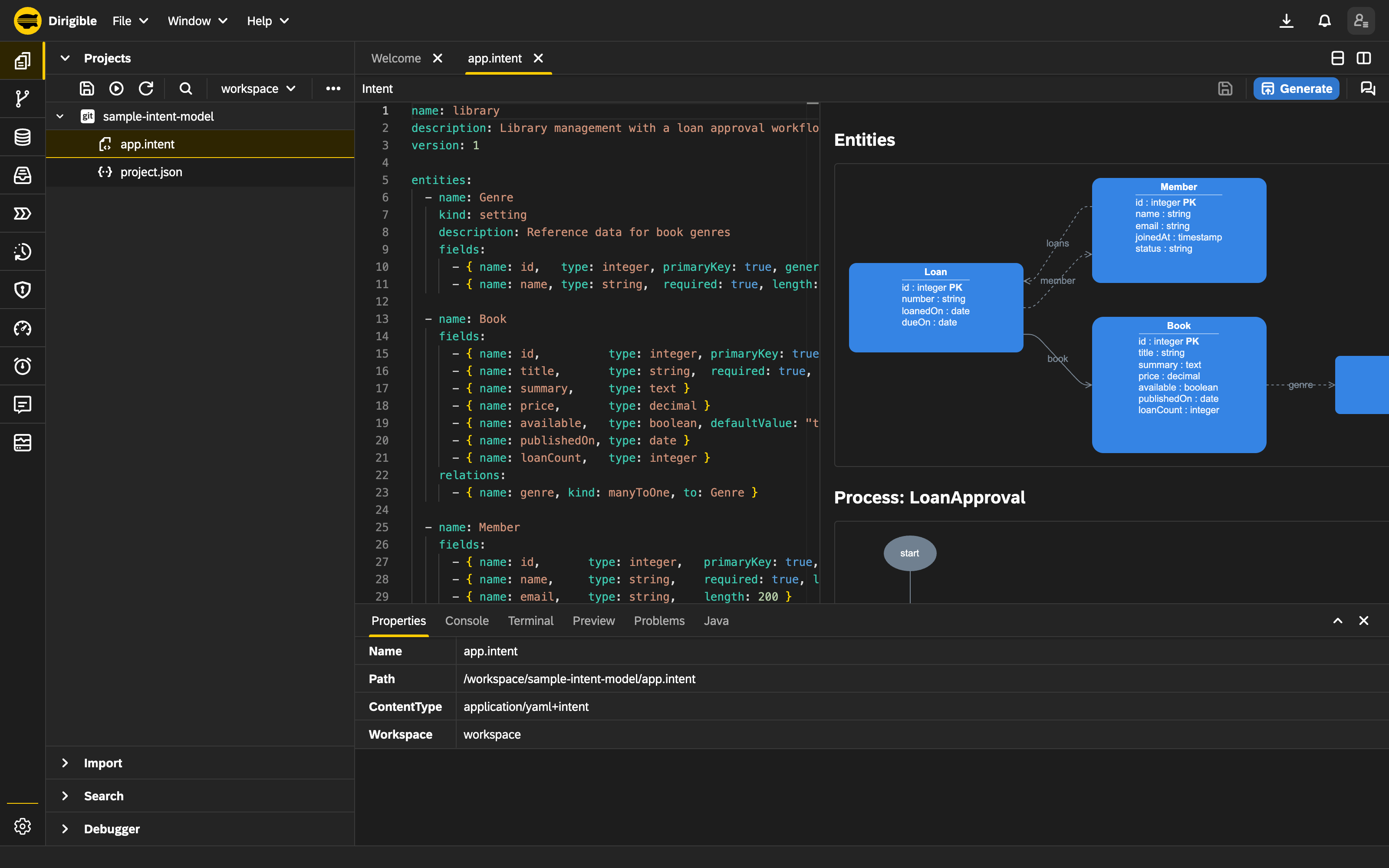
The Intent Editor: YAML on the left, the live entity and process diagram on the right.
Ask, and it changes
Writing the first draft from a prompt (Step 1) is only half the story. The assistant does not leave once the intent exists - it stays wired into the editor, and you can ask it to change the running model in plain language. This is the part that makes the red pill worth taking.

Open the assistant pane and describe the change you want:
"Add an
isbnfield to Book, unique. Add aReservationentity linking a Member and a Book with a status. Make Member.email required."
The assistant does not patch blindly. It returns the complete proposed app.intent as a diff against your current buffer, so you see exactly what changes - a field here, a new entity there, an added relation. You Accept or Reject. Nothing touches disk or the database until you do; the assistant never writes behind your back.
Accept, then Save and Generate, and the change ripples through all three altitudes: the model files, the schema, the persistence, the REST APIs, the UI and the workflow all follow. You changed one file, in a sentence, and reviewed a diff - the platform rebuilt the application to match.
That is the real distance between Model-Driven Architecture and Intent-Driven Development. With MDA you hand-edit models across layers and keep them in sync yourself. With IDD you hold a conversation over one reviewable file, and every change stays deterministic, diffable and regenerated end to end. The assistant runs on a configured LLM provider, so the model behind it is yours to choose.
Step 5 - Generate
Click Generate. The platform writes the model files next to your intent, then chains the model-to-code generation: a Java persistence layer, REST controllers, a modern Harmonia single-page UI, the BPMN processes, the forms, the report pages, and the seed data. Alongside the models it also emits the declarative glue - annotated client-Java against org.eclipse.dirigible.sdk.* - from the terse blocks at the bottom of the intent:
notifications:
  - name: loanUpdated
    event: { onUpdate: Loan }
    to: member.email
    subject: "Loan {id} for {member.name}, due {dueOn}"
    body: "Your loan changed."

schedules:
  - name: overdueLoans
    cron: "0 0 9 * * ?"
    entity: Loan
    where:
      - { field: dueOn, op: lt, value: CURRENT_DATE }
    notify: { to: member.email, subject: "Overdue loan {id} for {member.name}", body: "Your loan is overdue." }

rollups:
  - name: bookLoanCount   # maintain Book.loanCount as the number of Loans for each Book
    entity: Loan
    via: book
    field: loanCount
Each block becomes real code: loanUpdated a listener that emails the member on every loan update, overdueLoans a daily @Scheduled job that finds overdue loans via a typed Criteria, bookLoanCount a roll-up that keeps Book.loanCount in sync on every loan event. The intent also carries integrations (a POST to a partner endpoint on loan create) and inbound (a webhook that ingests a loan from a posted JSON body) in the same style. Publish, and the app is live.
Step 6 - Run the lifecycle
Open the generated app and walk the flow:
- Register a member - fill name and email; on save the member is inserted as PENDING (the column default) and the
MemberApprovalprocess starts, creating an approval task. - Approve the member - open the task from the built-in Process Inbox, review the read-only
ApproveMembercard, and click Approve (or Reject). Approve flipsstatusto ACTIVE so the member can borrow. - Create a loan - open the member record and add a
Loaninside its detail table: pick a book, set the loan and due dates. Saving mints a human-friendly loan number and starts theLoanApprovalprocess. - Librarian review - the Approve Loan task shows the loan dates plus
book.titleandbook.pricepulled one hop away. Approve it. - Rare book branch - if the book's price is over 500 the process routes to a curator review; otherwise it goes straight to notifying the member. The curator's approve/reject decides the final outcome.
- Notify - an approved loan reaches
notifyMember; theloanUpdatedlistener emails the member, andBook.loanCountticks up via the roll-up.
The dashboard surfaces a KPI tile fed by the MembersWithLoansDue report - the count of loans currently due, rendered as a compact number tile that opens the full report on click:
reports:
  - name: MembersWithLoansDue
    source: Loan
    description: Members with loans currently due
    dimensions: [member.name, loanedOn, dueOn]
    filter: "dueOn <= CURRENT_DATE"
    widget:
      kind: count
      label: Loans Due
      icon: alert-triangle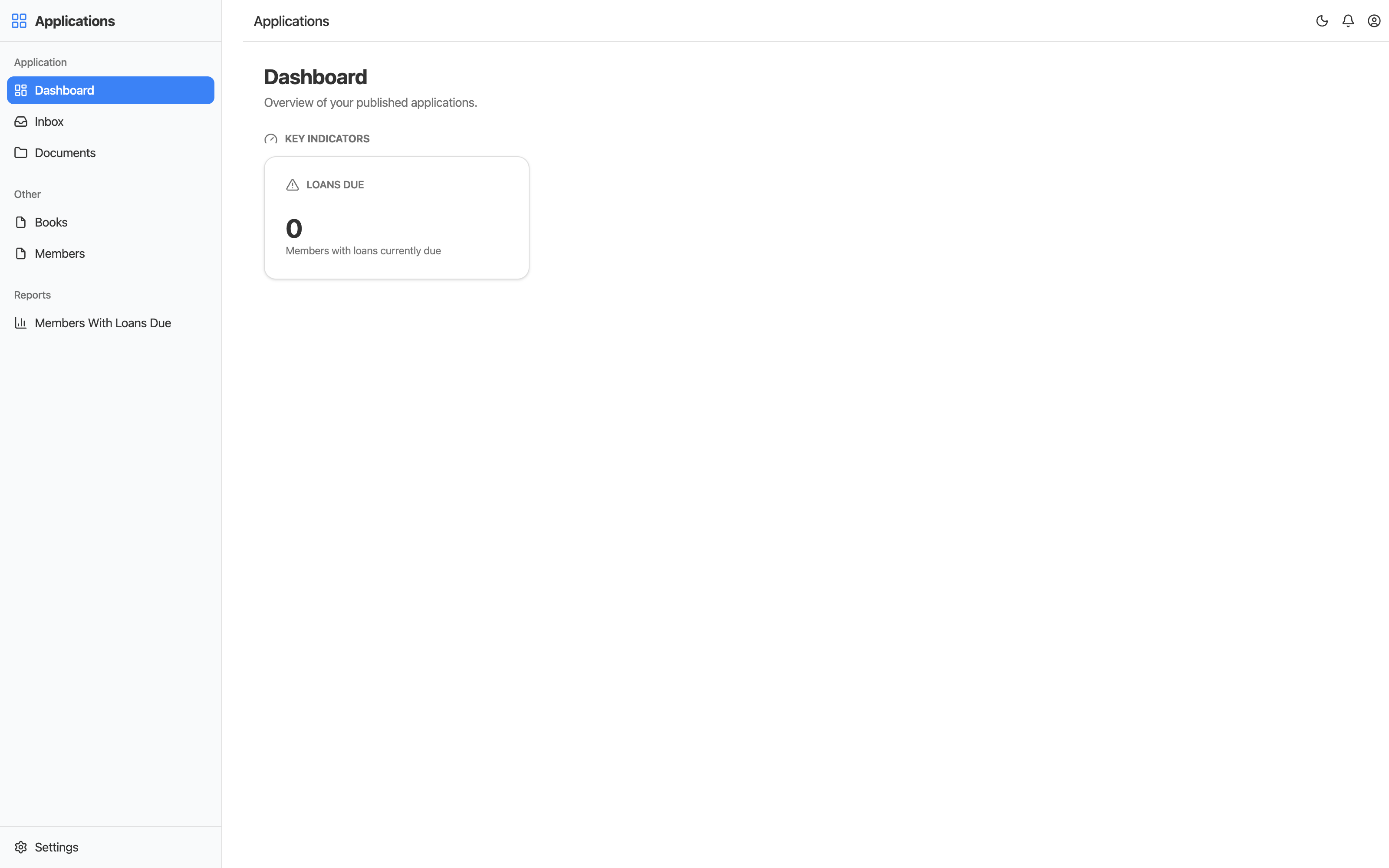
The running app: the generated shell, the entity sidebar, and the Loans Due KPI tile from the report - all from the one intent file.
What just happened
You wrote one YAML file. You did not write a single line of CRUD, SQL, REST routing, UI markup or BPMN XML. The master-detail member-and-loans screen, the two approval workflows, the task forms, the overdue-loan job, the notification listener, the loan-count roll-up and the seed data all came from the intent - and they regenerate deterministically every time you change it.
That is the Eclipse Dirigible promise: describe the application at the altitude of intent, and let the platform build the rest.
Where next
This single-module app is the foundation for the follow-ups:
- Composing a business suite - splitting shared reference data and cross-cutting concerns into reusable modules that many apps share, with one shared application shell.
- Documents that settle themselves - automatic roll-ups, cascading forms, and management reports that join across modules.
- Custom Java when the model isn't enough - dropping a hand-written handler (like the scaffolded
custom/NotifyMember.java) into the generated app without leaving the browser.
Explore the finished sample at sample-intent-model, and see the whole Eclipse Dirigible platform for what else it can build. Continue with composing a business suite.