


You took the red airship, and the first application was only the rabbit hole. The Matrix was never one program - it is countless small ones, each with a job, all speaking to each other. Real software is the same: you do not build one monolith, you compose a world from independent parts, each doing one thing well.
In the previous article we built our first app from a single intent file - one self-contained model. Real business systems are bigger: a billing domain spans invoices, payments and products, and they all lean on the same shared master data - customers, currencies, units of measure - used by a dozen apps. You do not want a copy of the Currency table in each one.
This article shows how Eclipse Dirigible composes a domain out of independent modules that reference each other across models, reuse one master-data table everywhere, and assemble into one shared application shell. The complete suite lives in the single sample-intent-multi-model repository, one folder per module.
The suite
A Billing domain, split into one module per concern - each a folder in the repository, each a single intent file:
| Module | Owns | References (cross-model) |
|---|---|---|
uoms | UoM | - |
countries | Country, City | - |
currencies | Currency, CurrencyRate | - |
numbers | Number series + reusable generator | - |
products | Product | UoM |
customers | Customer | Country, Currency |
customer-payments | CustomerPayment | Customer, Currency |
sales-invoices | SalesInvoice, items, allocations | Customer, Currency, UoM, CustomerPayment, Product, Numbers |
navigation | the shared-shell groups | - |
Reuse, don't redefine
Master data - Customer, Country, Currency, UoM - is owned by one module. Every other module that needs it stores an integer foreign key and renders a dropdown sourced from the owner's REST service. There is one Currency table, one place to change it.
A consumer declares what it depends on in a top-level uses: block, then points a relation at the owner with model::
name: customers
uses:
  - { model: countries }
  - { model: currencies }
entities:
  - name: Customer
    relations:
      - { name: Country,  kind: manyToOne, to: Country,  model: countries }
      - { name: Currency, kind: manyToOne, to: Currency, model: currencies }
The customers module never generates a Country table or API - it just links to the one countries owns. Change Country once, and every consumer sees it.
Data is data - keep it out of the model
Reference data comes in two sizes, and the intent treats them differently. Small sets whose values are part of the flows (statuses, payment methods) stay inline as seed rows. Everything bulkier - the 249-row ISO 3166 country list, the currency table, and all the prepopulated demo data (customers, products, the sample invoices and their items) - lives in authored CSVs, and the seed just points at the file:
seeds:
  - name: countries
    entity: Country
    file: data/countries.csv
The intent stays lean (the countries model shrank from 272 lines to 49), each data/*.csv is owned and versioned by the developer, and only the import artefact is generated. Every module in the suite now keeps its prepopulated data this way.
Speak the user's language
Master data is also where translations live. The uoms module declares its UoM entity multilingual: true and lists the app's data languages:
languages: [en, bg]
entities:
  - name: UoM
    multilingual: true
seeds:
  - name: uoms-bg
    entity: UoM
    language: bg
    rows:
      - { id: 8,  name: "Килограм" }
      - { id: 19, name: "Литър" }
Three things follow, none of them hand-written: the schema gains a language table for the translated names; every read overlays the caller's language onto the base values (a unit without a translation keeps its English name); and the shared shell gains a Region & Language setting - pick Bulgarian there and every dropdown, list and document that shows a unit of measure reads Килограм instead of Kilogram, across all the modules that reuse it. Translate the master data once, in the module that owns it, and the whole suite speaks the language.
And not only the data: the UI itself translates through the same switch. Generation emits a translation catalog per module with every label the screens use - buttons, messages, field labels, and the entity display names in both their forms: the humanized singular (Sales Invoice, for form captions and "New X") and the humanized plural (Sales Invoices, for the sidebar, list titles and detail panels) as separate keys, so a translator can render them properly (Фактура за продажба / Фактури за продажба - one key could never be both). Add a Bulgarian catalog next to the generated English one and the sidebar, the shared shell's tiles and every generated screen follow the Region & Language setting; anything untranslated gracefully stays English.
Reuse code, too
Modules can own reusable logic, not just reference tables: numbers owns a Number series entity plus a small reusable DocumentNumberGenerator, and the invoice's process calls it (via a delegate service task) to stamp SI00000001-style numbers. One number generator, reused by every document module in the suite - see the custom-Java post for how that delegate is written.
Documents that work together
Composition is not only about referencing another module's data - the documents also behave across module boundaries: an invoice is settled by payments through a cross-model n:m with automatic paid/balance/status roll-ups, the allocation forms guide the user with cascading Depends-On controls, and management reports join the customers' and products' tables for their names. Those are the subject of the next post in the series - here it is enough to know that all of them are declared in the same intent files, and none of them break the module independence described above.
One shared shell - no app-hopping
Each module generates its own standalone app, which is handy for running or testing one concern in isolation. But they also contribute their screens to one shared application shell, so users never jump between per-module UIs.
Two pieces drive this. First, each entity names the navigation group it belongs to:
entities:
  - name: Customer
    group: partners        # appears under "Partners" in the shared shell
Second, a dedicated navigation module declares each group once (so it is not redeclared per module), as a small contribution on the platform's application-perspectives extension point:
// navigation/configs/sales.js
exports.getPerspectiveGroup = () => ({
  id: 'sales', label: 'Sales', expanded: true, order: 20,
  icon: '/services/web/resources/unicons/receipt.svg', items: []
});
Publish the suite and open the shared shell at /services/web/application/: one app, one grouped sidebar - Partners, Sales, Payments, Settings - every screen embedded in the one shell.
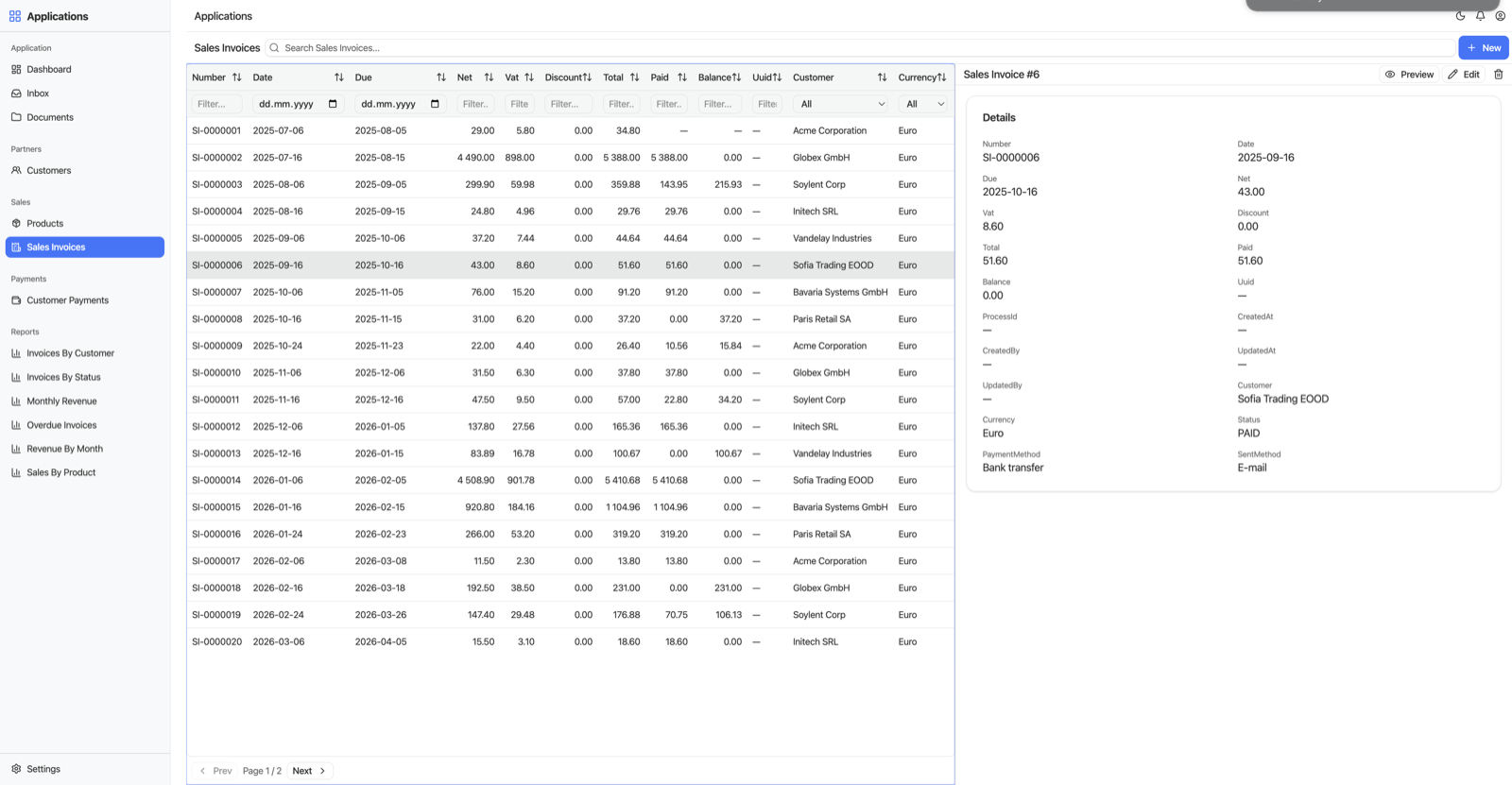
One shell, every module: the grouped sidebar spans Customers, Products, Sales Invoices, Payments and the cross-module reports - here browsing invoices with a detail preview on the right.
Packaging in practice

In the sample, every module is a folder in one repository for convenience. In a real system each module would be its own repository, versioned and shipped independently as an npm module and consumed by others as a dependency. A consuming module declares what it needs in its package.json:
{
  "name": "@dirigiblelabs/customers",
  "version": "1.0.0",
  "dependencies": {
    "@dirigiblelabs/countries": "^1.0.0",
    "@dirigiblelabs/currencies": "^1.0.0"
  }
}
npm install pulls the owner modules in, and they deploy into the runtime alongside the consumer. A reusable module like currencies is published once and reused across many applications - the cross-model uses: reference resolves against whatever owner is installed.
Generate and publish
A consumer resolves its cross-model references against the owner's model - and the platform resolves them order-independently, falling back to the registry as a first-class source when an owner is not open in your workspace. So you no longer have to generate strictly leaf-first; if an owner cannot be resolved at all, generation fails loudly with a clear message rather than producing a broken dropdown.
A natural order is still the simplest mental model:
- Generate the owners (leaves):
uoms,countries,currencies,numbers. - Then
customersandproducts, thencustomer-payments, thensales-invoices. - Publish everything (the
navigationmodule too) and open/services/web/application/.
At runtime the cross-model dropdowns call the owner module's live REST service, so every owner must be published - but the generation order between them is now flexible.
The payoff
Build a piece of master data once; reuse it everywhere; compose independently-shipped modules into one coherent application. That is how Dirigible scales from a single app to an enterprise suite without duplication - and the whole suite is there to clone: sample-intent-multi-model.
Next in the series: how the documents behave across those module boundaries - payment allocation with roll-ups, cascading forms, and cross-module reports.