


You took the red airship, built an app, and composed a suite. This is the part where the world starts moving on its own - payments find their invoices, balances keep themselves, notices send themselves, reports assemble from every module. You do not write the glue between documents anymore; you declare it, and watch the system run itself.
The first post in this series built an app from a single intent file; the second composed a billing suite from independent modules that reuse each other's master data. This one is about what happens between the documents once the suite runs: a customer pays, and someone has to figure out which invoices that payment covers, keep every invoice's paid/outstanding amounts straight, and answer management's "who owes us what?"
In most systems that is reconciliation code, UI event handlers and a reporting tool. On Eclipse Dirigible it is a few more blocks in the same intent file.
Many-to-many across modules
An invoice can be settled by many payments, and a payment can span many invoices - a classic n:m, but the two sides live in different modules (the sales-invoices and customer-payments modules of sample-intent-multi-model). You model it as an explicit intermediate entity that carries the allocation amount:
- name: SalesInvoiceCustomerPayment
  fields:
    - { name: id,     type: integer, primaryKey: true, generated: true }
    - { name: amount, type: decimal, precision: 18, scale: 2, required: true }
  relations:
    - { name: SalesInvoice,    kind: manyToOne, to: SalesInvoice,    composition: true, required: true }
    - { name: CustomerPayment, kind: manyToOne, to: CustomerPayment, model: customer-payments, required: true, show: [date, number] }
One side is a local composition (the invoice owns the allocation); the other is a cross-model reference to the payment.
The show: [date, number] attribute surfaces the payment's booking date and bank transaction number as extra read-only columns in the invoice's allocations table. The FK lookup already fetches the referenced row to resolve its label, so these columns cost no extra request - and because no cross-app URL has to be built, show works even when the target lives in another module, as it does here.
Declarative settlement
The link table is only half the story - who creates those allocations? On Eclipse Dirigible you declare it, you don't code it. The invoice module adds two blocks:
# Paid = sum of the allocation amounts; Balance = Total - Paid; Status flips to PARTIAL / PAID.
rollups:
  - { name: invoicePaid, entity: SalesInvoiceCustomerPayment, via: SalesInvoice, field: paid, op: sum, of: amount,
      capacity: total, balance: balance, status: Status, statusWhenFull: 7, statusWhenPartial: 6 }

# Auto-allocation: spread a customer's payments across their open invoices (oldest first), matching
# Customer + Currency, until spent - generated as client-Java glue under gen/events.
settlements:
  - { name: autoAllocate, junction: SalesInvoiceCustomerPayment, invoice: SalesInvoice, payment: CustomerPayment,
      amount: amount, total: total, paid: paid, pot: amount, order: date,
      match: [Customer, Currency], status: Status, payableStatuses: [3, 4, 6] }
The rollups: block keeps Paid / Balance / Status in lockstep with the allocations; the settlements: block generates the auto-allocation delegates. Both span two modules (invoices and payments) yet are declared entirely in the invoice's intent - no hand-written integration code.
Auto-allocation is not a black box, either: the generated allocations panel on the invoice also offers a manual Add button and a per-row Delete, so a wrong allocation is corrected by removing the row and adding the right one. Manual changes go through the same generated repository as the automatic ones, so the Paid / Balance / Status roll-up recomputes either way.
Forms that react - Depends-On
Settlement handles the machine's side; Depends-On handles the human's. A form control declares dependsOn on a sibling to-one relation (the trigger), and when the trigger's selection changes the control reacts - it re-filters its dropdown, or copies a value. Three shapes cover everything:
# cascade - the City list narrows to the chosen Country's cities (filterBy)
- { name: City, kind: manyToOne, to: City, model: countries,
    dependsOn: { relation: Country, filterBy: Country } }

# narrow-to-referenced - the UoM list narrows to the product's own base unit and auto-selects it
- { name: UoM, kind: manyToOne, to: UoM, model: uoms,
    dependsOn: { relation: Product, valueFrom: UoM } }

# auto-populate - the line price is copied from the chosen product's default (still editable)
- { name: price, type: decimal, precision: 18, scale: 2, required: true,
    dependsOn: { relation: Product, valueFrom: price } }
A relation with dependsOn filters its options (filterBy; a single remaining option is auto-selected); a field with dependsOn copies a value (valueFrom). And crucially: the trigger and the target may live in different modules - above, City/Country belong to the countries module, Product to products, UoM to uoms, while the declaring entities sit in customers and sales-invoices.
The payment-allocation dialog chains three of them into a guided flow: Customer is narrowed to the invoice's own customer, CustomerPayment is filtered to that customer's payments, and amount defaults to the chosen payment's amount - pick, pick, confirm:
- name: SalesInvoiceCustomerPayment
  fields:
    - { name: amount, type: decimal, precision: 18, scale: 2, required: true,
        dependsOn: { relation: CustomerPayment, valueFrom: amount } }
  relations:
    - { name: SalesInvoice,    kind: manyToOne, to: SalesInvoice, composition: true, required: true }
    - { name: Customer,        kind: manyToOne, to: Customer, model: customers,
        dependsOn: { relation: SalesInvoice, valueFrom: Customer } }
    - { name: CustomerPayment, kind: manyToOne, to: CustomerPayment, model: customer-payments,
        required: true, dependsOn: { relation: Customer, filterBy: Customer } }
That is the manual complement to the auto-settlement above: the machine allocates the obvious cases, and when a human steps in to correct one, the form itself steers them to the right payment with the right amount.
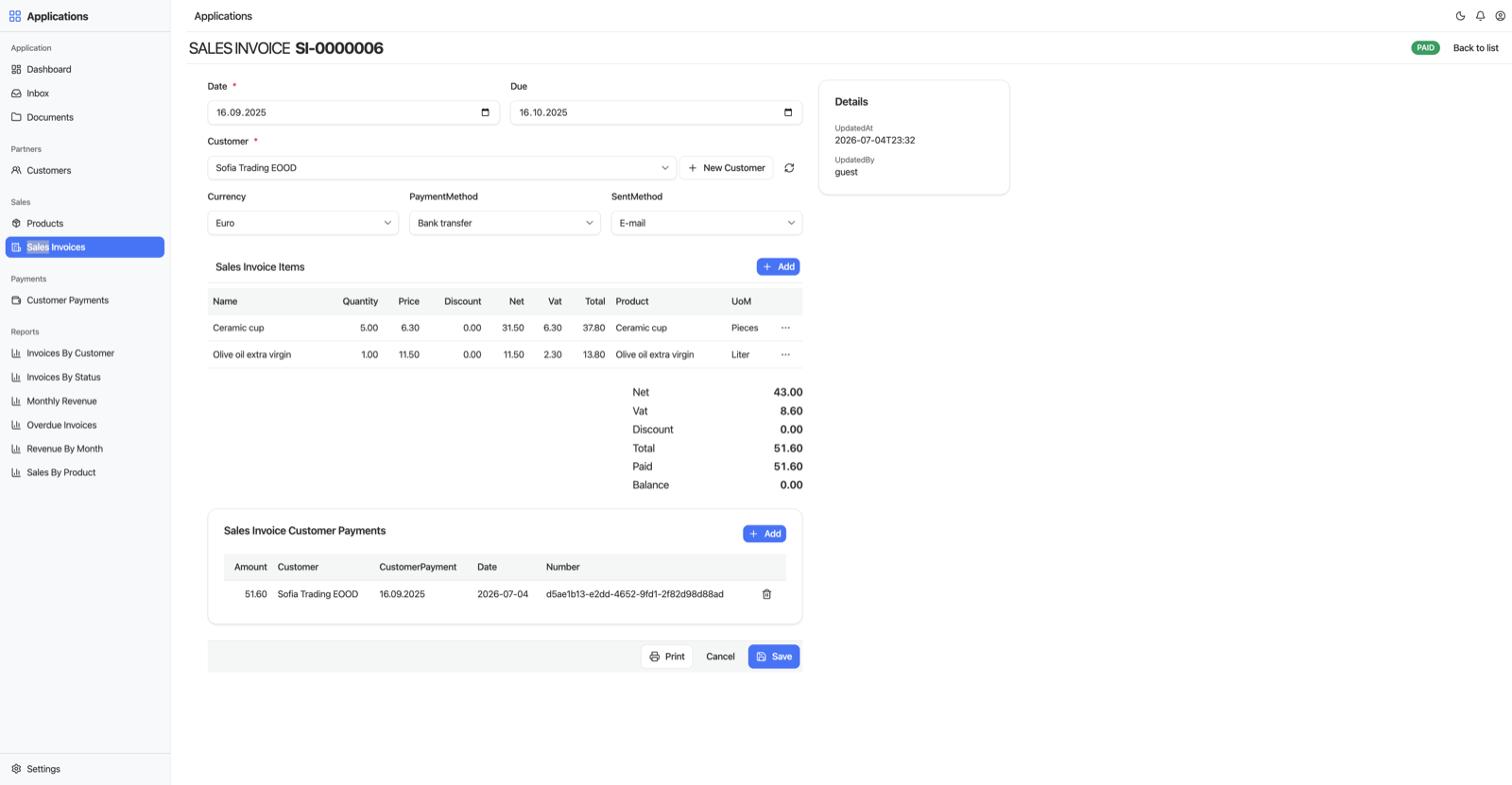
A settled invoice: the allocations panel shows the customer payment applied, and the roll-up keeps Paid, Balance and the PAID status in sync.
Reports that join across modules
Once the documents flow, management wants the numbers. The invoice module declares six reports in the same intent - a reports: block with a source entity, dimensions and aggregate measures:
reports:
  - name: InvoicesByCustomer
    source: SalesInvoice
    description: Invoice count, revenue, paid and outstanding balance per customer
    dimensions: [Customer]
    measures: ["count(*)", "sum(total)", "sum(paid)", "sum(balance)"]
  - name: OverdueInvoices
    source: SalesInvoice
    dimensions: [number, date, due, Customer, total, balance]
    filter: "due <= CURRENT_DATE AND balance > 0"
  - name: SalesByProduct
    source: SalesInvoiceItem
    dimensions: [Product]
    measures: ["sum(quantity)", "count(*)", "sum(total)"]
A dimension can be a plain field, a same-model relation (a status report shows the status name), or a cross-model relation: Customer and Product are owned by other modules, and the report joins the owning model's table to show the customer or product name instead of a raw foreign-key id. A filter: turns a report into a focused operational listing, like the overdue invoices above. Dimensions can also bucket time - RevenueByMonth and MonthlyRevenue group on month(date) for revenue, net and VAT per month.
The generated app renders these as Reports pages in the sidebar, and every report table gets typed per-column filters - date ranges, number ranges, text contains - applied server-side, so pagination, counts and the CSV export all reflect what you filtered.
Some reports never open a page. Add a widget: and the report becomes a KPI tile on the shared dashboard:
  - name: OverdueInvoices
    widget: { kind: count, label: Overdue Invoices, icon: alert-triangle }
  - name: RevenueByMonth
    dimensions: ["month(date)"]
    measures: ["sum(total)"]
    widget:
      value: "sum(total)"
      at: { "month(date)": now }     # pin the bucket to the current month
      label: Revenue (this month)
The three widget kinds are count (the row count), value (a single aggregate cell - the now token in at: resolves at view time, so the tile always shows this month), and list (the first N rows). These business-meaningful KPIs replace the automatic per-entity record-count tiles the dashboard used to show.
And a report can render as a chart instead of a table - MonthlyRevenue sets chart: bar and its page draws one bar per measure across the month buckets (bar, line, pie, doughnut, polarArea and radar are all available). A Table/Chart toggle keeps the filters, CSV export and print working on the same data.
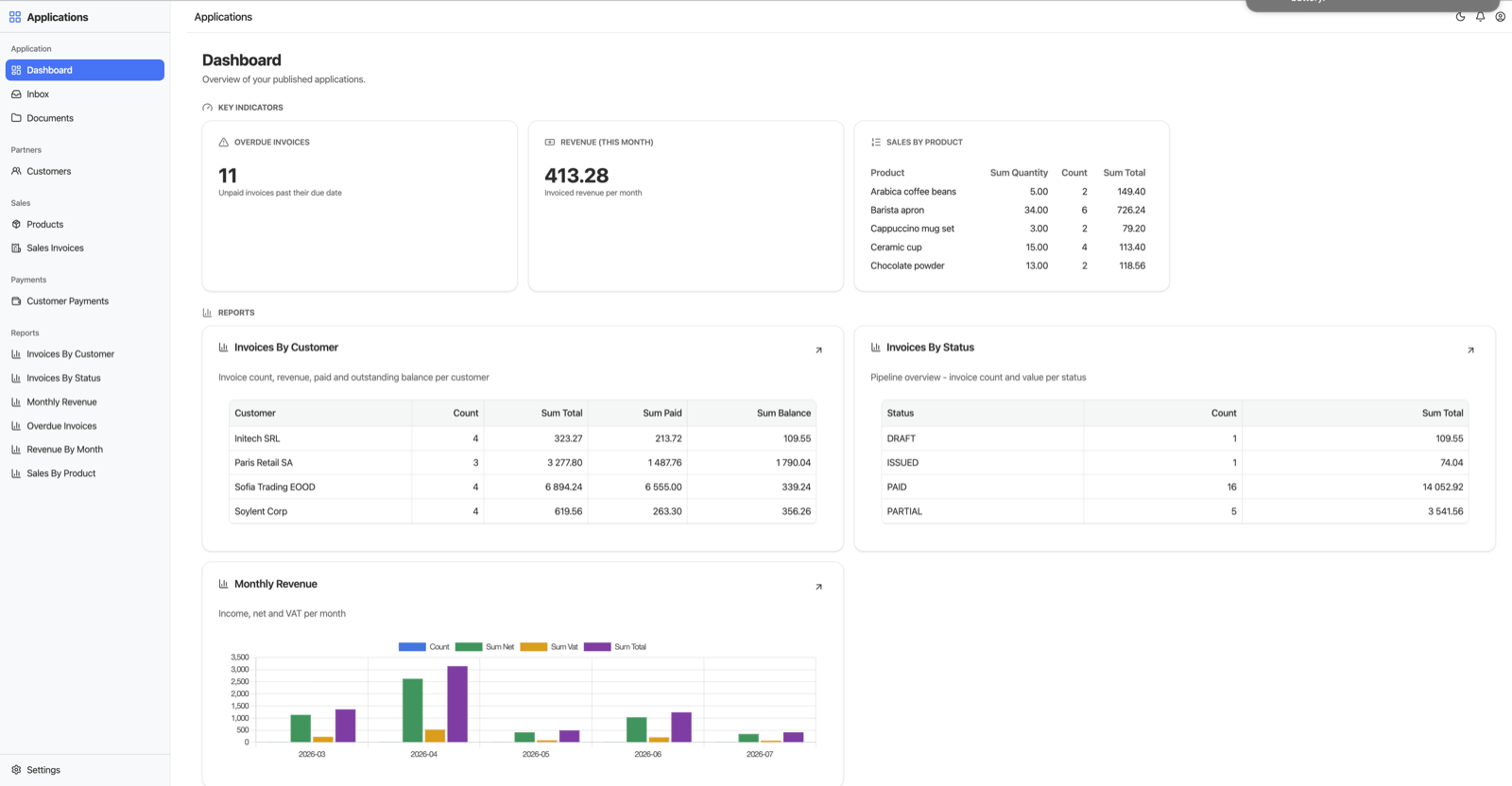
The dashboard aggregates the cross-module reports: KPI tiles up top, the Invoices By Customer and By Status tables, and Monthly Revenue rendered as a bar chart via chart: bar.
Paper still happens - printing

Invoices get sent, reports get handed out. Both print without writing a line of layout code:
- Documents carry a Print button. Generation seeds a print template per document entity into the platform's CMS (
Templates/SalesInvoice/Print/en/standard.print) - a small declarative layout (header, fields, items table, totals footer) that is merged with the live document and rendered server-side to PDF. The template is plain text in the CMS: download it from the Documents perspective, adjust the layout or wording (Cyrillic and other scripts render correctly), upload it back - customizations survive regeneration. Add a template per language (Print/bg/) and printing follows the user's Region & Language setting, offering the language choice when several exist. - Reports print too: the report pages gain a Print button that renders the full filtered result set (not just the visible page) into a clean print document - title, row count, timestamp, formatted numeric columns - and chart reports print a snapshot of the chart itself.
Between the allocations keeping themselves consistent and the paperwork printing itself, what is left is the part only you can do: deciding what the business rules should be.
The payoff
Allocation, roll-up, guided correction and reporting are the parts of a billing system that usually accumulate the most hand-written glue - and the most bugs. Here they are four declarative blocks in the intent that already owns the document: relations for the n:m, rollups: + settlements: for the money flow, dependsOn for the forms, reports: for the numbers. When the requirements change, you change the declaration and regenerate.
The one piece of genuinely custom logic in the suite - the sequential invoice number - is hand-written Java, and that story is the custom-Java post. Everything else you have seen in this series came from intent files, and the full sample is sample-intent-multi-model.